Geometry Vibes is a diagonal arrow game published by the studio gameVgames on GameDistribution on January 20, 2025. The idea comes from the wave mode in Geometry Dash: you do not jump, you go up when you press and down when you let go, between two walls of spikes. During our run, the first thing you notice is not the difficulty but the shop screen that slips in before every level.
Three modes on a single home screen
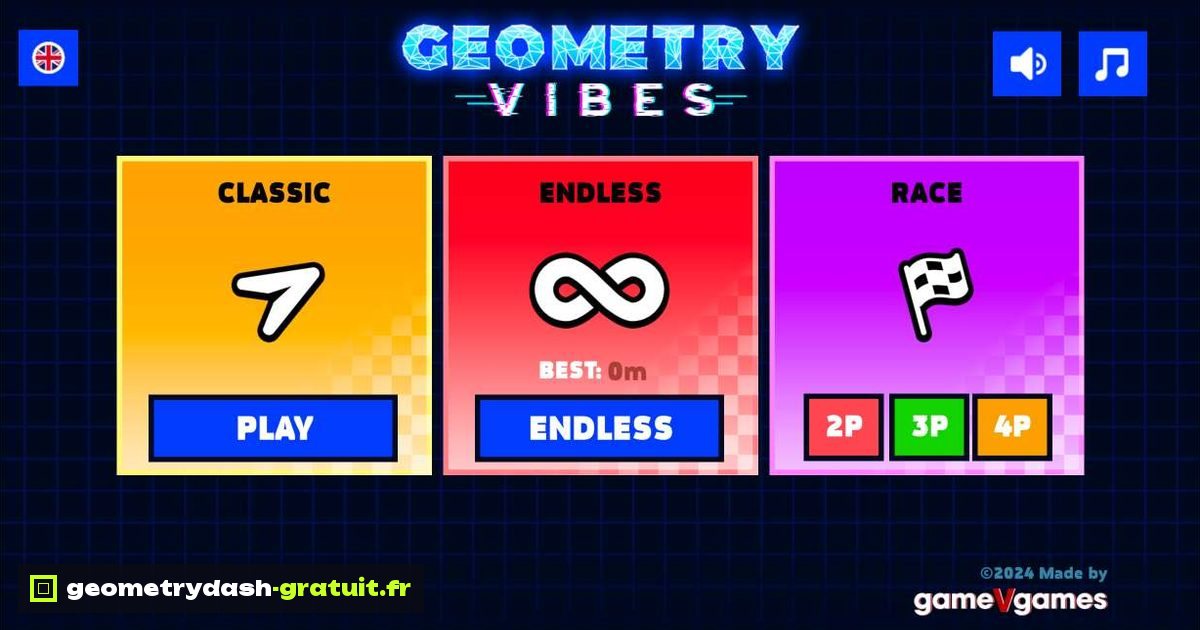
After the PLAY button on the loading screen, the menu shows three cards side by side. Classic gives access to the levels. Endless starts an endless run and keeps a best in meters (shown as "BEST: 0m" at the start). Race offers three buttons, 2P, 3P and 4P, to play with others on the same device. At the top, a flag is used to change language and two icons mute the sound effects and the music. The bottom right corner reads "©2024 Made by gameVgames" and version V1.0.
How many levels does Classic mode have?
Ten. The "Select Level" screen lays them out in two rows of five with a difficulty label: levels 1 and 2 in Easy, 3 and 4 in Normal, 5 and 6 in Hard, 7 and 8 in Extreme, 9 and 10 in Insane. Only level 1 is open at the start, with a progress percentage under the icon. The nine others carry a padlock and the word LOCKED.
Each level starts with a three second countdown. A bar at the top of the screen gives the level name and the percentage completed. On our first attempt, the arrow hit the ceiling of spikes at 2.5%, which gives you an idea of the speed as early as the Easy level.
The shop before every run
Clicking a level does not open the level but a shop. Three tabs at the top, twelve arrow designs in the first one, and a big START button at the bottom. Six arrows are bought with coins, from 770 to 3,900. Five others are unlocked by watching video ads: the counters show 0/1, 0/2 or 0/3 videos. With a balance of 0 coins at the start, only the basic arrow can be used.
This is the most tiresome part of the game: the screen comes back before every attempt and adds a pointless click when you chain attempts on the same level.
What happens when the arrow hits a spike?
The game first offers a green "REVIVAL?" button with a video icon. It lets you pick the run back up at the same spot in exchange for an ad, with the Space key as a shortcut. If you let the countdown run out, the fail screen shows the percentage reached and two buttons: RESTART (R key) and MAIN MENU (M key). These keyboard shortcuts save you from reaching for the mouse between two attempts.
The ads go through GameDistribution, which distributes the game. In our test, no video played before the title screen, but they are the game's currency for arrows and revives.
Mouse, Space or touchscreen
The "[MOUSE - SPACE]" reminder appears at the start of the level: hold the click or hold the space bar to go up, release to go down. There is no jump, only two directions at 45 degrees. On a phone in portrait, the game frame takes the full width of the screen and the title screen stays readable, but the play area is then only about 210 pixels tall: the Fullscreen button under the game becomes almost mandatory.
Geometry Vibes or another wave game?
If you like the wave mode but the shop wears you out, Geometry Dash Wave uses the same mechanic in a Scratch project, with automatic checkpoints and no purchase screen. To get back to RobTop's official levels, with the cube and the ship, the Geometry Dash Lite version on our home page offers Stereo Madness and the levels that follow. And if you would rather have a game where you switch gravity instead of sliding diagonally, Geometry Dash Spider is played with a single click per teleport.
For the first official level rather than the wave, Geometry Dash Scratch by Griffpatch recreates Stereo Madness in the Scratch player.
gameVgames has also released a pseudo 3D sequel, Geometry Vibes 3D, presented on the studio's page.